I have a small machine on my home network whose entire job is to answer one question: what’s going on, right now, here? Not in a datacenter’s idea of “here” — my here. The temperature on my back fence, the air quality two valleys over, whether that smudge on the radar is going to ruin the evening — and who just tripped the motion sensor by the front door.
It’s called Hone (rhymes with “home”; the git remote still says leather, which is a story for another day). I didn’t start it from scratch — I forked a personal health dashboard I’d already built, mostly to inherit its Nuxt 3 + Tailwind + ApexCharts stack and a design system I didn’t want to rebuild. Then I ripped out the health metrics and pointed the whole thing at weather APIs and the sensors in my house.
This post isn’t a tour of every integration (there are a lot of them, and free public-data APIs deserve their own war-story post). It’s about the one architectural decision that made the rest tractable: treating a forecast number from a government supercomputer, a reading from a $30 sensor on my fence, and a security camera by my door as the exact same kind of thing. Get that right, and you earn something that still surprises me — the freedom to render those same sensors two completely different ways: as flat tiles in a grid, and as pins on a 3D model of my actual home.
First, the sprawl I made for myself
The honest version: the early dashboard was a mess of my own making. I had two near-duplicate editors for arranging sensors, a separate read-only viewer that rendered things slightly differently than the editors did, and three competing mechanisms for choosing which dashboard you were even looking at. Every time I added a sensor I had to touch all of them, and they’d drift.
This is the classic personal-project trap. Nobody’s reviewing your PRs, so the complexity just… accretes. The refactor that fixed it is the actual subject here, and it came down to two ideas.
Idea one: split the registry from the layout
The core move was separating what exists from how it’s arranged.
The registry (
data/entities.json) is the catalog: every sensor and metric that exists, plus its default rendering — what label it gets, what unit, how big it wants to be.The layout (
data/dashboard.json) is just an arrangement: this entity here, that one there, this size on this page.
Before, those two concerns were tangled together in every one of those competing editors. Pulling them apart meant a sensor could be defined once and then placed on any page without redefining it — and a page became a thin thing, just positions and overrides referencing the registry.
The payoff shows up the moment you want a second page. A future /garden or /air page doesn’t re-describe the sensors; it reuses the registry defaults and only stores what’s different about that page’s arrangement. The catalog is the source of truth; layouts are cheap.
Idea two: one render primitive for everything
The second move was collapsing all that rendering into a single component — Widget.vue — that every grid cell goes through. The main dashboard, the live preview in the config screen, any future page: all of it renders through the same primitive.
A Widget knows three kinds:
widget— an actual sensor/metric tilespacer— deliberate empty spacegroup— a labeled cluster of widgets
And critically, it resolves its display in layers: per-placement overrides fall back to the entity’s registry defaults. So if I never say otherwise, my fence thermometer looks the way the registry says it should, everywhere it appears. If I do want it bigger on one page, that’s a one-key override on that placement — not a fork of the component.
One primitive means one place where label, value, and sizing are decided. The “viewer renders slightly differently than the editor” bug class just stops being possible, because there’s no second renderer to drift.
The trick that ties it together: a virtual weather group
Here’s the part I’m quietly proud of. My physical sensors come from Home Assistant — an Ecowitt station outside, some ESPHome stuff inside — over its REST API. My weather data comes from Open-Meteo. Those are wildly different sources with wildly different shapes.
Instead of special-casing weather everywhere in the UI, I inject the Open-Meteo metrics as a virtual entity “group” — a synthetic registry entry that behaves like a cluster of sensors. So as far as the registry, the layout, and Widget.vue are concerned, “current humidity from the API” is the same kind of object as “humidity from the box on my fence.”
That’s the whole game. Once API data and sensor data are the same kind of thing, every downstream system — placement, overrides, sizing, the editor — works on both for free. I never wrote a “weather widget.” I wrote a Widget, and taught the registry to describe weather.
The same registry, now in 3D
Everything so far has been flat — tiles in a grid. But once every sensor is a registry entity, nothing says a registry entity has to render as a tile. So I built a second surface for the home half of the system: a 3D model of my actual house that you pin sensors onto in real space.
The model is a Gaussian splat — a photogrammetric capture of my home’s exterior. I render it in a point style rather than full splatting, which sounds like a downgrade but isn’t: the capture isn’t a perfect reconstruction, and the point look is more forgiving of the gaps than a “solid” surface that tries to pretend it’s complete and lands in the uncanny valley instead.
On top of that model sits an annotation system with three kinds — and here’s the part that matters: they bind to the same entity registry as the Widget grid. A motion sensor isn’t redefined for the 3D view; it’s the same entity, rendered as a spatial pin instead of a tile.
camera— a security camera, encoded with both position and range (where it is and roughly what it can see), driven by the same sensor data as everything else. The live feed is toggleable — a marker by default, the actual camera when you want it.motion— motion sensors get the same position-and-range treatment as cameras: not just a dot, but a sense of the area they cover.place— zones, typically the entry points to the house: the doors and approaches you’d actually care about.
Taken together it reads less like a gimmick and more like a security overview — the kind of thing you’d leave up on a wall display: a calm, spatial answer to “what’s happening around the house right now,” with the option to drill into any camera.
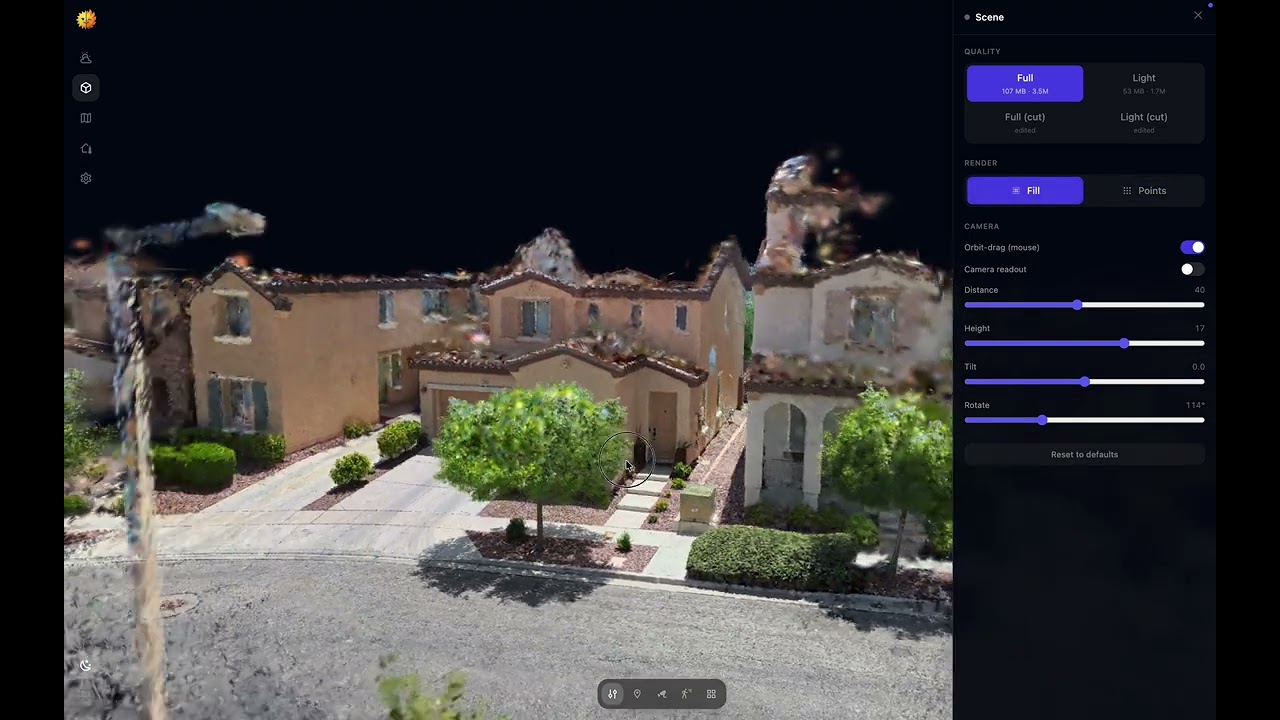
I’ll be honest about where this sits: it’s the most conceptual and ambitious part of Hone. I went in half-expecting to bounce off the limits of browser-side 3D, and instead kept getting surprised at how far this tech has quietly come — it’s meaningfully further along than I assumed was possible. It’s still an experiment I’m actively shaping, not a finished feature.
But the reason it works at all is the boring decision from three sections ago. Because cameras and motion sensors were already registry entities, the 3D view didn’t need its own data layer, its own state, or its own definition of what a “camera” is. It just needed a different way to draw one. Same registry, second surface.
Resilience falls out of the architecture, not on top of it
The same uniformity bought me something I didn’t fully anticipate: graceful degradation became an architectural property instead of a feature I had to bolt on.
Every third-party call goes through a server route (server/api/*) — partly so API keys never reach the browser, partly so there’s exactly one place to cache. Each route has a short TTL cache, and the cache supports a stale-fallback (getStale): if the upstream is down, serve the last-known-good value instead of an error.
That cache turned out to matter, because free weather data has teeth. Open-Meteo’s free tier has a daily request cap, and the day I blew through it, the dashboard’s whole core — current conditions, forecast, the little sparklines — went blank. So I built a fallback chain:
Open-Meteo → NWS → stale cache → soft-empty. Never a 500.
The interesting work was the NWS adapter. The National Weather Service’s API (US-only, and it makes you send a User-Agent) models the world completely differently from Open-Meteo. Rather than teach the UI about a second shape, the adapter reshapes NWS responses back into Open-Meteo’s contract — including computing sunrise/sunset locally with a SunCalc-style algorithm, because NWS simply doesn’t give you those, and mapping NWS’s condition codes onto the WMO codes the UI already understood. The front end needed zero changes to survive its primary data source vanishing. That’s the registry-vs-layout discipline paying rent again: one contract, many sources.
One scar worth sharing: early on, a rate-limited empty response got cached for the full TTL. So even after Open-Meteo recovered, the dashboard stayed broken until the cache expired — a self-inflicted time bomb. The fix is a rule I’d now apply anywhere: never cache an empty result; serve stale instead. Cache your failures as deliberately as your successes.
What the architecture actually bought me
The proof of any architecture is how cheaply you can add the next thing. The 3D model is the dramatic example, but the everyday ones matter too — two recent map additions slotted in without reshaping the UI:
An animated wind layer — jet-stream-style particles, the windy.com / earth.nullschool.net look. That one’s a genuine saga (the data comes from NOAA’s GFS model via UCAR’s THREDDS server as small netCDF subsets, parsed in pure JS — not Open-Meteo, and emphatically not the NOMADS OpenDAP endpoint, which NOAA retired out from under me mid-build). But from the dashboard’s perspective it was just another layer.
Air-quality layers — AirNow station dots plus a native map heatmap for the smoke-haze look, no extra tile service or token.
I’ll save the full rendering-gremlins post-mortem (there was a WebGL crash that ate a weekend) for its own write-up. And the long-term sensor history — wired to SQLite — is still firmly in the “we’ll see” column.
What I’d take to the next project
Pick your data model before your renderer. Deciding that weather is a kind of entity, and that a camera is a kind of entity, dictated everything downstream — and is the only reason one motion sensor can be both a tile and a point in 3D space.
One way to do each thing. Tailwind only, ApexCharts only (I deleted Chart.js on purpose), one render primitive, one living styleguide. Constraints are kind to future-you.
Make degradation structural. Fallback chains and stale caches mean the dashboard never goes blank — and because everything shares a contract, resilience didn’t cost me UI complexity.
Forking your own old project is a legitimate accelerant. I started three steps ahead by stealing from past-me.
It’s not a product. It’s a thing I built for my house, and it’s still very much in motion. But the bones are good now — and whatever sensor I add next, I already know it’ll render through the same registry as everything else. As a tile, as a pin on the house, or as both. Which is the entire point.